Ad (728x90)

Showing posts with label Info. Show all posts

Monday, August 18, 2014

CARA SERVIS BLACKBERRY RUSAK

Belakangan ini gue punya masalah sama BB alias Blackberry gue. Blackberry gue mati, pas di pencet tombol power itu nyala tapi macet di loading screen antara 70 - 80%. kira kira gambarnya seperti ini.

Setelah itu gue coba cari cari caara gimana benerinya, dan akhirnya gue menemukan pencerahan dari pencarian gue itu. Dan di postingan kali ini gue bakal share caranya ke kalian semua. Berikut caranya step by step. semoga bermanfaat.

Alat alat yang dibutuhkan :
  • Komputer berbasis windows
  • Install blackberry desktop manager
  • Download Blackberry OS yang ingin di install
Kamu bisa download Blackberry Desktop Manager versi terbaru di BlackBerry.com website dan OS Blackberry terbaru dapat di Download di  BlackBerry OS superpage.

Jika sudah di download dan di install, bisa kita mulai percobaan dari step 1.

# STEP 1
  Pastikan Blackberry anda tidak tersambuung dengan komputer anda dulu. Buka file browser anda Program files > common files > research in motion > Apploader
Jika sudah, buka aplikasi bernama LOADER. klik 2 kali seperti pada gambar.


Jika di klik 2 kali akan muncul gambar seperti ini. klik next


# STEP 2
ketika muncul pop up seperti gambar di atas, sambungkan blackberry anda ke komputer dan tunggu hingga pilihan COM1 berubah menjadi USB-PIN:UNKNOWN lalu klik NEXT.

TIPS: Setelah tulisan USB-PIN:UNKNOWN muncul, anda harus secara cepat klik next. Karena jika anda telat anda akan gagal dan harus mencoba ulang. Hal ini dilakukan tanpa baterai.
Pastikan anda pasang baterai ketika sudah memulai penginstalan OS.

Jika anda gagal pada step 2, cabut baterai dan usb lalu pasang kembali dan coba lagi.
Langkah ini dilakukan tanpa baterai


Klik next segera ketika USB-PIN:UNKNOWN muncul


# STEP 3
Pilih pilihan aplikasi yang anda ingin install seperti contoh (BrickBreaker, BlackBerry Messenger, BlackBerry Maps, dll.), klik next, mulai menginstall dengan klik finish. Duduk santai sambil minum kopi, karena step ini memakan waktu beberapa menit. Ketika selesai install, blackberry anda akan reboot secara otomatis dan akan memakan waktu antara 10 - 15 menit minimal. *Cabut USB ketika sedang reboot.
jangan takut gagal, karena reboot kali ini butuh waktu sangat lama.


klik finish untuk memulai proses installasi.


proses instalasi.


installasi selesai, tunggu sampai reboot blackberry anda selesai
# STEP 4
Nah ketika Blackeberry selesai reboot berarti kita sudah selesai. Blackberry anda akan terasa seperti baru. anda harus menyelesaikan setup wizard (mengatur waktu, tanggal, huruf, dll).
Saya sarankan untuk mem back up blackberry anda untuk mengantisipasi kerusakan seperti ini.


Jangan lupa untuk back up BB anda sebelum install aplikasi. semoga bermanfaat dan jangan lupa comment untuk memberitahukan apa cara ini berhasil untuk kalian. see ya on the next post :)
Info Tutorial

Tuesday, June 17, 2014

ADOBE PHOTOSHOP LIGHTROOM 2.5 SERIAL KEY

Photoshop Lightroom

Adobe Photoshop Lightroom 2.5 serial number

1160-4390-0623-5139-5715-8315


Aperture 3
E-346-DTS-276-WJE-172-UTP-074-KOZ-84X-5S7X

Comic Life 1.4.4
Name: Apple BundleS/N: comcstd001-0026-D4N3-1HER-36A0-BFCR

Final Cut Express 4E-335-PIL-508-OQL-416-UDH-507-QSX-TCA-Z29X
iWork 0993G9-PE44-KRJE-QANS-EK5F-5S2
Info

ADOBE CS3 MASTER COLLECTION SERIAL KEY

Adobe CS3

Adobe Creative Suite 3 Master Collection 

serial number Cs3 for PC


1325-1999-9763-4179-2872-9865

Info

ADOBE PHOTOSHOP CS5 SERIAL KEY

Adobe Photoshop CS5

Adobe Photoshop cs5 Serial Number

1330-1927-7762-6383-0202-0414
Info

Thursday, March 20, 2014

HOW TO REPAIR A DIE BLACKBERRY

Die BlackBerry problem
The fundamental problem with the Nuked Berry scenario is that because the device is stuck in a permanent reboot sequence or loop, when you attach it your computer via USB cable it simply connects and disconnects over and over and over again (you’ll just keep hearing that USB detected/unplugged noise) as the BlackBerry turns on/off. This makes using the BlackBerry Desktop Manager software to reload your OS impossible as the device is only detected for a couple of seconds before the device shuts off (and is now undetected).
Stucked Blackberry
With pulling your BlackBerry’s battery doing nothing to solve the problem and it being impossible to establish a link to your desktop, at this point if you called your carrier for support there’s a chance they’ll tell you your BlackBerry is broken and that it’s time for a new one. To me that’s not a bad thing (what’s better than getting a new BlackBerry?!), but it’s not the CrackBerry way! Let's fix it!

Requirments:
  • Using windows computer
  • Have blackberry desktop manager inside
  • Have the blackberry operating system you want to install/reload onto your die blackberry installed
You can download the latest version of BlackBerry Desktop Manager from the BlackBerry.com website, and you can find the latest Operating System available for your device from our BlackBerry OS superpage.
Keep in mind that during this process you don’t necessarily have to reload the same version of the OS that’s currently running on your Nuked BlackBerry. With the example I’m going through today, I’m actually going to revert to a slightly older operating system. There was an OSv4.3.1 Beta for the Curve I got my hands on way back when. Well, it turns out it had a slight glitch that made it want to occasionally reboot the phone when I answered incoming calls (which I was living with ok), but after Nuking my Berry while testing some software a friend of mine was working on, I decided to take the opportunity to revert back to the very stable OSv4.2.2. To accomplish this, on my computer I first open Control Panel > Add/Remove Software and uninstalled the current Operating System for the 8300 Curve. From there I went to AT&T’s website and downloaded and installed OSv4.2.2.
And now for the disclaimer, aka Bad News. With the process I’m going through here, any 3rd party applications you have installed on your BlackBerry will be lost. This install gives you a clean slate, which is a heck of a lot better than a Nuked Berry. So once you’re up to speed, you will have to install all your favorite apps once again.
The following process doesn't just work for Nuked BlackBerrys. You can also use it to clean the slate/reload/update the OS on a BlackBerry that's in fine working order.
Step #1: Make sure your BlackBerry IS NOT connected to your computer. Locate and Open the App Loader application. You won't have a shortcut to this program on your start menu. You need to locate it manually. Open your file browser, go to your C Drive (operating system drive) and navigate your way through the folders to Program Files > Common Files >Research In Motion > AppLoader.  Once you are in the AppLoader directory, double click on the Loader application shortcut. Once Loader opens, you can click Next  and then proceed to Step #2. As you may have noticed, we skip Desktop Manager altogether.
Step 1: Browse your way into the AppLoader Directory, and Open the Loader Application
The Loader Homescreen. You can Click Next to Continue
After you click next, Loader Waits for you to Connect the Device.
Proceed to Step #2
Step #2: We need to connect the BlackBerry to the Computer via USB cable. But here's where the tricky part comes in with the Nuked BlackBerry. Do you see in the image above where it says COM1? What we want to do is plug in the BlackBerry, and when COM1 switches to say USB-PIN:UNKNOWN we immediately click Next. This catches the BlackBerry and takes it out of the constant reboot cycle and allows you to then reload the Operating System.
Tip: The USB-PIN:UNKNOWN option will display for a few seconds when the BlackBerry is first connected/flashing its LED in red. With a Nuked BlackBerry,  That occurs when the device is in the initial start-up part of it's reboot sequence. The easiest way to get that to happen (vs. waiting for that step in the reboot sequence where you have a tenth of a second to hit Next before you lose your chance) is to simply pull the battery from the BlackBerry. With the battery pulled, connect the BlackBerry to the USB connector and as SOON as you see USB-PIN:UNKNOWN hit Next. You have to be quick still, but using this method you are in control of the timing. From there you can put the battery back in and battery cover back on (Make Sure you install the battery or else when the OS update is completing and the device disconnects from the computer to reboot, it will lose the power provided by the USB connection and you will get an error and have to do it all over again!).
** If you don't get it right the first time, try again (unplug from USB, pull battery, connect and hit Next while USB-PIN:Unknown is showing). You have to be fast and the timing is key, so it may take you three or four tries. 
Connect Your BlackBerry via USB. Click NEXT as Soon as USB:UNKNOWN Appears
Tip: With Battery Out, Connect BlackBerry to USB.
This will give you more control in nailing the timing of
connecting Next while USB:UNKOWN displays
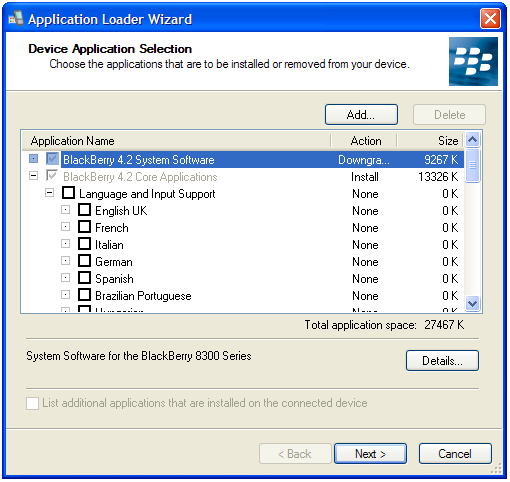
Step #3: With your BlackBerry now out of the permanent reboot sequence, you are essentially in the clear and well on your way to having your BlackBerry up and running again. Choose the options you want to install on your BlackBerry (BrickBreaker, BlackBerry Messenger, BlackBerry Maps, etc.), click next, then approve the installation by clicking "Finish." Sit back and relax while the BlackBerry does its thing. It'll take some time and go through a number of screens but eventually you will reach my favorite "The loading operation was successful" screen. Your BlackBerry will reboot itself at this point and it will take a LONG time to reboot (10 - 15 minutes or so). You can unplug it from the USB (it's not connected while rebooting) and just continue to sit back and wait. Get scared, but not too scared...it will eventually boot up.
Select the OS options you want to install
Approve the Operating System Installalation Options
Sit back and relax and let the installer do its thing
Installation Complete! Just sit back and let your BlackBerry Reboot
Step #4: That's it! You are done. Brand New BlackBerry. With your BlackBerry no longer Nuked, you can run through the Set Up Wizard (set the date/time/fonts, etc.) and from there you WILL NOW BE ABLE TO connect to the BlackBerry Desktop Manager software. Hopefully you occasionally back up your data and can now use Desktop Manager's restore function to load up your backed up data. If not, hopefully you have your contacts all synced to Outlook so you can reload your Address book from there. Once that's done, it's time to install all your favorite apps again! I'd recommend starting with the CrackBerry.com Launcher (visit http://wap.crackberry.com on your BlackBerry's browser to download it!). Happy BlackBerrying!
At least in this case I KNEW I was putting some risky software onto my BlackBerry
so before installing did a backup of my data. Once I un-nuked my BlackBerry
I was able to relatively quickly get back to where I was before.
That's all folks! This is one of those lessons that I hope you don't need to use, but if you ever do find yourself with a Nuked BlackBerry I hope this lesson gets you back up and running quickly. There are some alterantives to this method as well, including some third-party apps like BBSAK (see another tutorial here). And if you're still stuck, the CrackBerry Forums are only a click away!
Article Tags: blackberry hardware loop, blackberry reboot loop, hard reset, blackberry, pearl, curve, 8100, 8110, 8120, 8130, 8700, 8703, 8300, 8310, 8320, 8330, 8800, 8820, 8830, reload operating system
Info

Saturday, November 30, 2013

WINDOWS 8 SERIAL KEY

Windows 8 Release Preview Universal Product key:
TK8TP-9JN6P-7X7WW-RFFTV-B7QPF

Jika Anda ingin mengaktifkan Windows 8 Media Center gunakan serial key di bawah ini:
MBFBV-W3DP2-2MVKN-PJCQD-KKTF7 

Windows 8 Professional Edition Key :XKY4K-2NRWR-8F6P2-448RF-CRYQH
Windows 8 Release Preview Key:TK8TP-9JN6P-7X7WW-RFFTV-B7QPF
Windows 8 Consumer Preview Key:DNJXJ-7XBW8-2378T-X22TX-BKG7J 
Windows 8 Developers Preview Product key:6RH4V-HNTWC-JQKG8-RFR3R-36498
Windows Server 8 Developers Version Key:4Y8N3-H7MMW-C76VJ-YD3XV-MBDKV
6RH4V-HNTWC-JQKG8-RFR3R-36498
4Y8N3-H7MMW-C76VJ-YD3XV-MBDKV
MBFBV-W3DP2-2MVKN-PJCQD-KKTF7
28VNV-HF42G-K2WM9-JXRJQ-2WBQW
NF32V-Q9P3W-7DR7Y-JGWRW-JFCK8
English: DNJXJ-7XBW8-2378T-X22TX-BKG7J
Chienese: DNJXJ-7XBW8-2378T-X22TX-BKG7J
French: DNJXJ-7XBW8-2378T-X22TX-BKG7J
German: DNJXJ-7XBW8-2378T-X22TX-BKG7J
Japanese: DNJXJ-7XBW8-2378T-X22TX-BKG7J
Info

WINDOWS 8 ACTIVATION TUTORIAL

1. Cara Otomatis
    Window 8 dapat di aktivasi secara otomatis dan tanpa serial key? Caranya? Caranya mudah, saya merekomendasikan sebuah aplikasi yang dapat mengaktivasi windows 8 dan microsoft office ke versi full dengan cara 1 kali klik menggunakan KMSpico. Informasi lebih lanjut tentang kmspico dan bagaimana cara mengoperasikanya silahkan saja buka link nya disini.

2. Cara manual

  • Kita perlu mengintegrasikan kunci dengan Windows 8 instalasi itu sendiri, Sehingga tidak perlu untuk memeriksa BIOS untuk SERIAL KEY.
  • Buat text file yang diberi nama PID.
  • Buka dan ketik kata - kata seperti yang ditunjukkan pada gambar di bawah ini.
  • Di sini Anda perlu mengganti xxxx dengan SERIAL KEY Anda sendiri.

  • Simpan file dan salin ke F:\sources. Berikut F adalah bootable Windows 8 Instalasi disk / flashdisk.
SOLUSI ERROR 0XC004F061:
  • Jalankan registry editor. Tekan WIN + R lalu ketik regedit.
  • Arahkan ke entri Key berikut:

HKEY_LOCAL_MACHINE\SOFTWARE\ Microsoft\Windows\ CurrentVersion\Setup\OOBE.
  • Ubah nilai untuk 'MediaBootInstall' dari 1 sampai 0. klik dua kali pada entri untuk mengubah nilai.
  • Buka command prompt. Hal ini dapat dilakukan dengan membuka command prompt sebagai admin.
  • Jalankan perintah: slmgr -rearm.
  • REBOOT sytem

Untuk lebih jelasnya lagi silahkan lihat video tutorial berikut :


Leave a comment :D
Info

Friday, August 23, 2013

FREE DOWNLOAD KMSpico

KMSpico – is the ideal tool to activate the final version of Windows 7 /8 and Office 2010/2013. Activator does not require user intervention, the entire activation process takes place in the background, just run the activator and a couple of minutes to check the activation status of Windows and/or Office.
Ya now you can activate windows product vista/7/8 and office 2010/2013 with ease. This tool is very simple and tested by our team and found that it is the easiest tool ever found on internet to activate microsoft product and it is recommended by me to activate your product by using this tool.
KMSpico v8.4
- Requirements: .NET 4.0 or Windows 8.
– Activates Windows Vista/7/8 and Office 2010/2013.
– Windows Server 2008/2008R2/2012
Features:
• Universal (active: Vista / 7/8 Pro / Enterprise / N and Office 2010/2013 Retail / VL)
• Does not require user intervention (enough to run the activator).
• Simultaneous activation of Windows and Office immediately.
With KMSnano can:
• Activate Windows 8 Enterprise
• Activate Windows 8 Professional
• Activate Microsoft Office 2013
• Activate Microsoft Office Visio 2013
• Activate Microsoft Office Project 2013
• Activate Microsoft Office 2010
• Activate Microsoft Office Visio 2010
• Activate Microsoft Office Project 2010
• Activate Windows 7 Enterprise
• Activate Windows 7 Professional
• Activate Windows Vista Enterprise
• Activate Windows Vista Professional
1. Run KMSpico_Install.exe
2. Done.
Changes in v8.5:
  • Fixed bug with Retail and MAK activated windows.
  • KMSELDI automated.


OR
Info Software

MICROSOFT OFFICE 2013 SERIAL KEY


First of all Uninstall any of the previous version of MS Office from your computer, then Download and Install Microsoft Office Professional Plus 2013, and use below keys to activate your Office:

Y89N6-KWWJX-YHFVP-DWMGK-XKR9J
NVWXW-WWVFR-D6HKK-MW2BD-DV2KJ
MT7NR-6GWBK-QGHBV-2YBFG-72V28
JR3N8-YV72J-86V92-HC2PM-PRXTW
6QD6N-J7FQ2-HBMW2-KFJ29-JW728
2MNJP-QY9KX-MKBKM-9VFJ2-CJ9KK
4TBVN-9C666-WQBDD-FM3HX-DYDG


OFFICE 2013 PRO PLUS MSDN RETAIL:
2MNJP-QY9KX-MKBKM-9VFJ2-CJ9KK
MH2KN-96KYR-GTRD4-KBKP4-Q9JP9

OFFICE 2013 VISIO PRO PLUS MSDN RETAIL:
K6NC7-KMX7G-TC6RR-FDM23-8K6YQ

OFFICE 2013 PROJECT PRO PLUS MSDN RETAIL:
2NDRT-M9QTH-2BKP3-HPRVC-J42B9
828CH-G4FPY-HMH4R-32GCK-6D9BH
3W3MQ-H7M6X-3WYP7-TPCH6-8G8T2

This is all i know. Report me back if these serial work or not in the commend box
Info

MICROSOFT OFFICE PROFESSIONAL 2013 PLUS - ACTIVATION


Tutorial Aktivasi Microsoft Office 2013 - Sebelum ini, saya sudah share tentang download Microsoft Office 2013 Pro Plus dan serial key nya. Nah, kali ini saya akan share bagaimana cara untuk aktivasi Microsoft Office 2013 Pro Plus yang sudah anda download dan install di komputer anda. Ada 2 cara untuk mengaktivasi Office anda, cara pertama yaitu melalui menu "Windows Activation" yang ada di "System Setting", dan cara yang kedua melalui command prompt. Ingin tahu lebih jauh?

Kalau begitu tidak usah berlama-lama, akan saya berikan step-step aktivasinya dibawah ini :

Aktivasi Via Telepon

1. Install Office 2013
2. Before activate disconnect internet! Open Word 2013
3. Use the activation key

4.Enter the product key

5.Activation wizard click phone activation

6. Next step select UK and use skype for free call this number [+448000188354] ***[This step you can reconnect internet again]

7. Dial phone and If they ask:
Q: Product key for home or business
A: Home [Dial 1]

After giving installation ID final question:
Q: How many computer you want to use it
A: 1 [Dial 1]

8.You will get Confirmation ID. Use the Conf. ID then next to activate it.

Sebenarnya sudah ada aktivator untuk office 2013 ini, bisa dicoba menggunakan KMSpico Activator. Sekian share saya kali ini, GOOD LUCK
Info

Saturday, June 8, 2013

PRIVACY SETTING FACEBOOK TERBARU.

Pesan penting dari Facebook mengenai privacy di Facebook baru saja muncul ketika saya membuka akun Facebook hari ini, soalnya saya paling jarang buka Facebook dan tidak terlalu menggandrungi jaringan sosial satu ini (masuk cuma untuk main game FarmVille :mrgreen: ). Pesan yang intinya kita diminta mengatur/setting kembali halaman privacy kita dengan settingan terbaru.

Privacy settings Facebook terbaru ini sangat berbeda dengan settingan sebelumnya. Kali ini, pengaturan halaman privacy lebih kompleks dan powerfull. Facebook mempunyai beberapa level dasar untuk halaman privacy yaitu Friends (teman/kawan), Friends of Friends (teman dari teman), Everyone (setiap orang/orang lain). Nah, di halaman pengaturan privacy ini kita diminta mengatur halaman-halaman apa saja yang kita akan privacy-kan, apakah kepada Friends, Friends of Friends, atau Everyone. Semua itu tergantung kamu untuk mengaturnya. Kamu bisa mengatur halaman tersebut dari waktu ke waktu, all depend on you Guys.

Halaman yang kini kamu bisa atur privacy-nya yaitu:
  • About me
  • Family and Relationships
  • Work and Education
  • Posts I Create (Status Updates, Links, Photos, Videos, dan Notes)
  • Photos and Videos of Me
  • Birthday
  • Religious and Political Views
  • Address
  • Alamat email
Penjelasan bagaimana cara mengatur halaman privacy Facebook kamu bisa langsung menuju ke alamat ini – A guide to privacy on Facebook – http://www.facebook.com/privacy/explanation.php

Di situ tersedia tool Facebook yang bisa kamu gunakan untuk melihat bagaimana tampilan halaman private Facebook info kamu jika dilihat teman atau orang lain.

Dengan pengguna yang sudah melebihi 300 juta user, tentunya Facebook akan selalu mengembangkan segala sesuatunya untuk selalu memperingati usernya terhadap hal yang bisa merugikan user Facebook sendiri. Kewaspadaan terhadap Facebook login phising dan pencurian akun Facebook (hacking account) perlu ditingkatkan oleh user dengan privacy setting terbaru ini.

Jika merunut dari mesin mencari, banyak sekali tersedia situs-situs yang membuat artikel mengenai cara masuk ke akun Facebook orang lain dengan maksud dan berbagai tujuan. Lihat saja kata kunci yang sering di gunakan oleh orang yang ingin mengetahui cara dan bagaimana membuka akun Facebook orang lain:


  • cara mengetahui password Facebook orang
  • cara melihat password Facebook orang lain
  • cara membuka password Facebook orang lain
  • cara buka password Facebook orang
  • cara buka password FB orang
  • cara membuka Facebook orang lain tanpa password
  • cara download program mengetahui password facebook orang lain
  • data password Facebook
  • cara hack password Facebook yang sederhana
  • cara bobol password Facebook cepat
  • view facebook pass hack
  • cara buka FB orang tanpa password
  • bagaimana cara masuk ke Facebook orang lain tanpa mengetahui passwordnya
  • download software imperium hack Facebook free
  • cara masuk facebook orang lain tanpa login password


Info

Social Media


Social media atau jejaring sosial adalah suatu media sosialiasi yang dibentuk dari individu atau organisasi yang dijalin dengan satu atau lebih tipe relasi spesifik seperti nilai, visi, ide, teman, keturunan, dan lain sebagainya. Adapun beberpa situs web social media yang popular sekarang ini adalah Facebook, Twitter, Google Plus, MySpace, Linkedin dan lain-lain.
Info

Twitter


Twitter adalah salah satu situs web social media yang dimiliki dan dioperasikan oleh perusahaan Twitter Inc. Twitter berupa mikroblog yang memudahkan penggunanya untuk saling mengirim pesan yang disebut tweet. Tweet adalah pesan yang terbatas hingga 140 karakter yang bisa dilihat secara publik atau private. Pengguna dapat melihat tweet user lainnya yang dikenal dengan sebutan follower.
Info

Facebook


Facebook adalah situs web layanan jejaring sosial yang dirilis pada bulan Februari 2004 atas perusahaan Facebook, Inc. Facebook didirikan oleh Mark Zuckerberg bersama rekan-rekannya. Pada bulan Mei 2012, Facebook telah memiliki lebih dari 900 juta user. Melalui Facebook, pengguna dapat membuat profil pribadi, menambahkan teman, saling bertukar pesan, dan berbagai macam fitur yang membuat pengguna Facebook semakin betah bersosialisai melalui akun Facebooknya.
Info

Monday, May 27, 2013

BING HADIRKAN XML SITEMAP PLUGIN 1.0


Setelah merilis prieview plugin BING sitemap beberapa bulan lalu, akhirnya BING menghadirkan secara resmi "xml sitemap plugin 1.0". Plugin ini berfungsi bagi para webmaster untuk membuat sitemap xml untuk website dan di-submitt ke BING webmaster tool atau ke mesin pencari lainya.
plugin ini bekerja pada server windows (Internet information services - IIS) dan Apache HTTP.
Plugin BING xml sitemap bekerja secara otomatis nge-ping ke search engine ketika di-update (saat ini hanya untuk google dan BING).
Untuk mendownload BING xml sitemap plugin 1.0 silahkan klik link berikut http://www.bing.com/webmaster/help/bing-xml-sitemap-plugin-f50bebf5
Info

PENGERTIAN HORTATORY EXPOSITION

PENGERTIAN HORTATORY EXPOSITION TEXT

Disebutkan dalam Concise Oxford Dictionary, Hortatory termasuk kata sifat (adjective) bermakna "tending or aiming to exhort" ("cenderung atau bertujuan mendorong / mendesak orang lain untuk melakukan sesuatu"). Sedangkan Exposition  bermakna "a comprehensive description and explanation of a theory" ("Penjelasan dan penjabaran sebuah teori secara komprehensif").

Jadi secara bahasa, jika disimpulkan, hortatory exposition adalah teks yang menjelaskan sebuah teori/masalah secara komprehensif dengan tujuan mendorong orang lain melakukan / tidak melakukan sesuatu.

GENERIC STRUCTURE OF HORTATORY EXPOSITION

Generic Structure, atau susunan umum hortatory exposition adalah sebagai berikut :

1.  Thesis / General Statement

Thesis / general statement berisi pernyataan pembuka mengenai topik pembahasan. Sebagai contoh kita akan membahas mengenai bahaya rokok, thesis statement yang bisa kita gunakan misalnya :

“Rokok dapat menyebabkan kanker, serangan jantung, dan impotensi”.

2.  Arguments

Arguments, ”Pendapat” berisi berbagai pembahasan lanjutan dari thesis statement secara detail. Akan lebih baik jika argument ini tidak hanya berisi pendapat pribadi penulis saja tapi juga bisa berisi pendapat para pakar. Mengacu pada contoh thesis statement tentang rokok di atas, kita bisa membuat arguments pendukung dengan lebih detail, misalnya :

Argument 1 : Saya mengira serangan jantung yang dialami direktur PT. LaptopButut, Pak “XXX”, disebabkan karena intensitas merokok lebih banyak dari pada minum air putih.(Terus kembangkan paragraf ini lebih dalam)

Argument 2 : Telah banyak dibuktikan bahwa rokok hampir menjadi sebab utama penyakit kanker. (Terus kembangkan paragraf ini)

Argument 3 : Impotensi seorang bos “XXX” di kota “XXX” disebutkan karena kebiasaanya merokok sebelum tidur. (terus kembangkan lagi paragraf ini)

3.  Recommendation.

Recommendation / suggestion berisi saran penulis tentang topik pembahasan. Jika membahas tentang bahaya rokok, sobat pasti tahu dong apa yang harus disarankan?

CONTOH HORTATORY EXPOSITION

Contoh hortatory expostion ini diambil dari buku bahasa Inggris Interlanguage yang membahas tentang "Masyarakat Indonesia harus menghargai perbedaan budaya demi Kesatuan Bangsa." Mari kita simak...

Indonesian People Should Value All the Different Culture to Promote Unity of the Nation

Indonesia is a culturally-diverse country. Many different religions and cultures from many provinces are now seen living side by side in many places. One of the biggest questions facing Indonesian today is how to deal with a culturally diverse citizenry and then promote unity.

Therefore, Indonesians should appreciate differences among culture for the following reasons. Firstly, Indonesia is vulnerable to separation for its archipelago and culture diversity. Raising tolerance among people is the best way to maintain the unity among differences. Many ways or cultures of living are equally legal, even if they are not regarded as normal by some people. If a society claims to be tolerant of personal choice, then it must respect the personal choice to retain their heritage. Then, unity of the nation can be preserved.

Secondly, Indonesians must recognize that every culture has different customs and beliefs. Thus, people are forbidden to make judgments of comparative value, for it is measuring something unmeasured. A plurality of nations, especially in the modern era, can allow for cultural development and cultural exchange that benefits both parties. The cross-cultural understanding among cultures makes the world a better place and preserves the unity of the nation.

Lastly, raising nationalism is one way to preserve unity of the nation. It is a sense of fellow feeling between group members. This promotes cooperation and social cohesion within the group. The sense of social cooperation makes welfare, social security and medical programs much more likely and stronger.

Cultural differences are sometime a sensitive matter for people. Indonesian people must teach younger generation about the importance of the cultural identity and nationalism to promote unity of the nation.

Sekian posting kali ini. Tolong masukanya ya kalo ada yang kurang. Thanks

Info

Wednesday, May 1, 2013

CARA MEMPERBANYAK FOLLOWER DI TWITTER

1. Twiends
ini salah satu web yang paling saya percayai dalam memperbanyak followers, karna kita langsung follow dan di follow.
Daftar aja sob : twiends.com
- agan setting dulu seeds nya sob, SETTING > TWITTER > Edit seedsnya 2 aja sob.
- terus back ke home terus usahakan memfollow orang dengan "SEEDS" tertinggi, biasanya di sidebar kanan sidenya di atas 7 gan
- kalo seeds sobat udah banyak otomatis agan langsung di follow
NB: Jangan Lupa di verifikasi emailnya sob, setting terus msukin email lalu check emailnya sobat biar terverifikasi di anggap sah

2. plusfollowers.info
Ini tanpa harus daftar sob, agan cukup pilih yang free terus masukin username dan passwordnya dan tunggu hingga prosesnya selesai, dan langsung lihat followers sobat
sehari bisa sampai 200 followers sobat, kalo mau nambah lagi harus besok sob, karna ini 1 x 24 jam.
nb : following auto nambah juga.

3. followback.info
Ini tanpa harus daftar sob, agan cukup pilih yang free terus masukin username dan passwordnya dan tunggu hingga prosesnya selesai, dan langsung lihat followers sobat
sehari bisa sampai 200 followers sobat, kalo mau nambah lagi harus besok sob, karna ini 1 x 24 jam.
nb : following auto nambah juga.

4. newfollow.info
Ini tanpa harus daftar sob, agan cukup pilih yang free terus masukin username dan passwordnya dan tunggu hingga prosesnya selesai, dan langsung lihat followers sobat
sehari bisa sampai 200 followers sobat, kalo mau nambah lagi harus besok sob, karna ini 1 x 24 jam.
nb : following auto nambah juga.

5. hitfollow.info
Ini tanpa harus daftar sob, agan cukup pilih yang free terus masukin username dan passwordnya dan tunggu hingga prosesnya selesai, dan langsung lihat followers sobat
sehari bisa sampai 200 followers sobat, kalo mau nambah lagi harus besok sob, karna ini 1 x 24 jam.
nb : following auto nambah juga.

Cara Manual

1. sobat cukup main twitter biasa, sobat harus jd #teamfolback dan #jfb
2. sobat search aja #jfb , nah keluar tuh tweet yang ada #jfb, kalo si tweps minta RT, agan RT aja. Nanti sobat di follow, tapi sobat harus #jfb (janji follow back).

3. Setelah sobat search nanti pasti keluar banyak tuh, pilih aja terus RT sob.
Info

CARA MENAMPILKAN JUMLAH LINGKARAN/CIRCLE DI HASIL PENCARIAN GOOGLE

CARA MENAMPILKAN JUMLAH LINGKARAN/CIRCLE DI HASIL PENCARIAN GOOGLE - Bagaimana cara memunculkan jumlah lingkaran/circle google plus di hasil pencarian google. Selain rating bintang, dan foto profil ternyata ada tambahan baru di format hasil pencarian google yaitu jumlah lingkaran atau circle teman yang telah kita punya atau telah kita add.

Seperti yang sudah kita ketahui, Google Plus merupakan jejaring sosial yang masih bisa dikatakan belum populer untuk umum. Akan tetapi tidak untuk para blogger, Social Network ini merupakan media sharing yang sangat powerfull untuk meningkatkan rangking blognya. Selain update status, upload foto dan sharing artikel blog google plus juga bisa memberikan effek positif pada blog yang kita punya seperti tampilnya foto profil di hasil pencarian google yang sangat berfungsi untuk menarik pembaca mengklik artikel yang kita punya.
google plus
Google +
Memang kelihatannya caranya sepele tapi dengan jumlah teman banyak dan itu muncul di hasil pencarian google bisa menambah peluang untuk artikel kamu diklik oleh calon visitor yang sedang mencari berita menggunakan google.
CARA MEMBUAT LINGKARAN CIRCLE MUNCUL DIHASIL PENCARIAN GOOGLE
1. Hal pertama yang harus perlu kamu lakukan adalah menampilkan foto di hasil pencarian google
2. Setelah itu carilah teman sebanyak-banyaknya ke akun google plus kamu, tambahkan friends sebanyak mungkin ke dalam lingkaran atau circle google plus.
Kamu bisa mendapatkannya dari teman yang sudah saya add
add friend google plus

Jangan lupa juga untuk ikutan Friendship Community Google Plus ya biar rame :D
https://plus.google.com/u/0/communities/117655697357918002737
friendship community google plus

Batasan untuk menambah teman pada saat pertama kali kurang lebih 500 friends sehari, setelah itu dijatah 150 friends perhari.
3. Tunggu sampai mereka meng-add back, jika circle mu sudah lebih dari 10 maka jumlah lingkaran tersebut akan muncul dengan sendirinya seperti dibawah ini
menampilkan lingkaran circle di hasil pencarian google

Demikian CARA MENAMPILKAN LINGKARAN/CIRCLE DI HASIL PENCARIAN GOOGLE semoga bisa bermanfaat untuk menambah nilai seo blog kamu.
Info

CARA MENAMPILKAN FOTO DI HASIL PENCARIAN GOOGLE

CARA MENAMPILKAN FOTO DI HASIL PENCARIAN GOOGLE - Cara memunculkan foto profil dihasil SERP pencarian google dengan mudah dan simple. Dengan munculnya foto profil di hasil pencarian kamu bisa menarik pembaca untuk memilih artikel yang telah kamu buat. Maka trafik blog kamu juga akan ikut bertambah seiring dengan banyaknya orang yang memilih artikel kamu di hasil pencarian google.
cara menampilkan foto di hasil pencarian google

CARA MEMASANG FOTO DI HASIL PENCARIAN GOOGLE
1. Log in ke google plus, pilih menu Profile > Edit Profile
Edit Profile Google Plus

2. Pada pilihan Contributor to isi dengan url blog kamu, setelah itu klik save
contributor google plus

3. Masuk ke blogger > Template > Edit HTML > Proceed
4. Masukan URL profil google plus kamu dengan menggunakan kode meta tag setelah <head>
id google plus


<link href='https://plus.google.com/ID-GOOGLE-PLUS/posts' rel='author'/>
<link href='https://plus.google.com/ID-GOOGLE-PLUS/posts' rel='publisher'/>
5. Setelah itu pilih save template, kamu bisa mengecek foto tersebut apakah sudah tampil atau belum dengan menggunakan Richsnippet Google
menampilkan foto di hasil pencarian google

Jika sudah muncul maka kamu telah berhasil mengaplikasikan tutorial CARA MENAMPILKAN FOTO DI HASIL PENCARIAN GOOGLE Selamat yaa semoga bermanfaat.
Info

Friday, April 26, 2013

CARA MEMBUAT RATING BINTANG PADA HASIL PENCARIAN

CARA MEMBUAT RATING BINTANG PADA HASIL PENCARIAN - Bagaimana cara membuat tampilan rating bintang di hasil pencarian google dengan mudah dan pratis? Rating bintang ini sebenarnya berfungsi sebagai alat survey apakah sebuah artikel tersebut bagus atau tidak. Cara votingnya ada yang dilakukan secara manual ada juga yang dipasang secara otomatis.
rating bintang google
rating bntang google


Rating bintang ini bisa juga berfungsi untuk menarik pembaca agar memilih artikel yang sudah terindex di hasil pencarian google. Artikel dengan rating yang bagus akan dengan mudah untuk dipilih oleh calon pembaca yang sedang mencari-cari informasi di google.

CARA MEMASANG RATING BINTANG PADA HASIL PENCARIAN GOOGLE
1. Masuk ke dashboard > Template > Edit HTML > Proceed > Expand Template Widget
2. Cari kode <data:post.body/> dengan menggunakan ctrl+f kemudian pastekan kode dibawah ini setelahnya
HTML
<div itemscope='' itemtype='http://data-vocabulary.org/Review'>
Description: <span itemprop="description"><data:post.title/></span><br/>
Rating: <span itemprop='rating'>4.5</span><br/>
Reviewer: <span itemprop='reviewer'><data:post.author/></span><br/>
ItemReviewed: <span itemprop='itemreviewed'><data:post.title/></span></div>
3. Setelah itu klik Save Template
4. Setelah itu cek halaman postingan dengan Richsnippets Google masukan url postingan yang akan dicek, jika rating bintang sudah muncul maka kamu telah berhasil menerapkan tutorial ini
cara membuat rating bintang

Demikian CARA MEMBUAT RATING BINTANG PADA HASIL PENCARIAN semoga bisa bermanfaat bagi kamu salam blogger dan semoga sukses.
Info


We are featured contributor on entrepreneurship for many trusted business sites:

  • Keep in Touch

    Copyright © 2016 . Bloggertain™